 Sozdai
Marketplace Infographic Examples — Wildberries and Ozon Slides
We've put together a few infographic examples from different categories so you can see what working slides look like on WB and Ozon. All the images below were made in Sozdai from a regular product photo — no designer, no Photoshop. If you're interested in the process itself, see the step-by-step guide; here we'll have pictures with short notes on what works in each.
Slide, photo, card — what we're talking about
A small terminology note, because this gets muddled. A product card is the listing's full page on a marketplace: name, price, description, specs, and a carousel of 5–10 photos. The individual images in that carousel — the ones with arrows, icons, and headlines — are slides. Or, if you prefer, just photos, only dressed up for the "make a sale" job.
Sozdai generates exactly slides, one at a time. Upload a product photo, get one finished slide. Want a full set of 5–6 slides for a complete card — do several passes, each with its own focus: composition, dimensions, use case, and so on.
Why an infographic at all
In short, the marketplace buyer doesn't read the description. They swipe through the photo carousel. The brain finds it easier to parse an image than paragraphs of small text on a phone screen, and that's not a quirk of your buyer — that's how vision works in general.
Each slide closes its own job. The first hooks with a headline and a benefit. The second shows the material in close-up. The third explains how to use it. And so on, depending on the category. The logic is simple: one slide, one thought. If you try to cram five bullets onto one slide, no one will read past it to the second.
Cards with proper infographics convert noticeably better than bare white photos, by what we've observed. Specific numbers depend on the category, so treat the "+35% to sales" promises on competitors' landing pages with caution. The fact is that without an infographic you're simply invisible when neighbours are using one.
Examples by category
Apparel

In apparel the first slide usually carries the main promise: "compression without squeeze", "holds shape after 30 washes" — something specific, not "premium quality". The next slide is a close-up of the fabric with composition labelled. Then use cases: workout, daily wear. The 3:4 format is the same for both WB and Ozon, so one set of slides fits both marketplaces.
Cosmetics

In cosmetics the buyer decides on composition and expected effect. A slide with active ingredients works best when it's not a wall of text but icons with short phrases: "nourishes", "smooths", "protects from UV". Packaging always on a neutral background, warm light, no harsh shadows.
Electronics
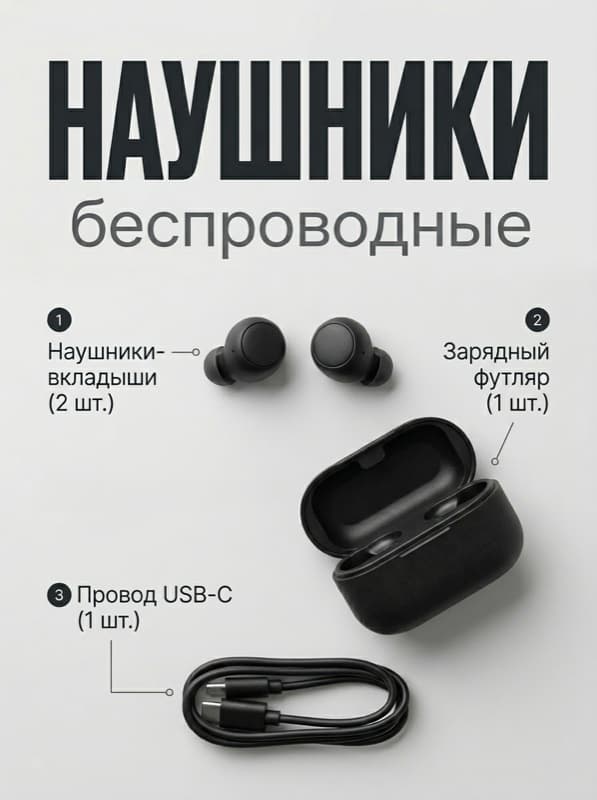
For tech, specs framed as benefits decide — not as a table. "Up to 30 hours on one charge", "Bluetooth 5.3", "noise cancellation" — each parameter on its own slide, with an icon and a large number. The buyer swipes fast, and if a number doesn't read in a second, it's as good as not there.
Home goods

In the household category use cases land well. "In the kitchen", "in the bathroom", "on the balcony" — show where this thing can go and how it fits in. If the product makes sense with a person in the frame (even as a silhouette), add it — that noticeably lifts click-through.
Groceries
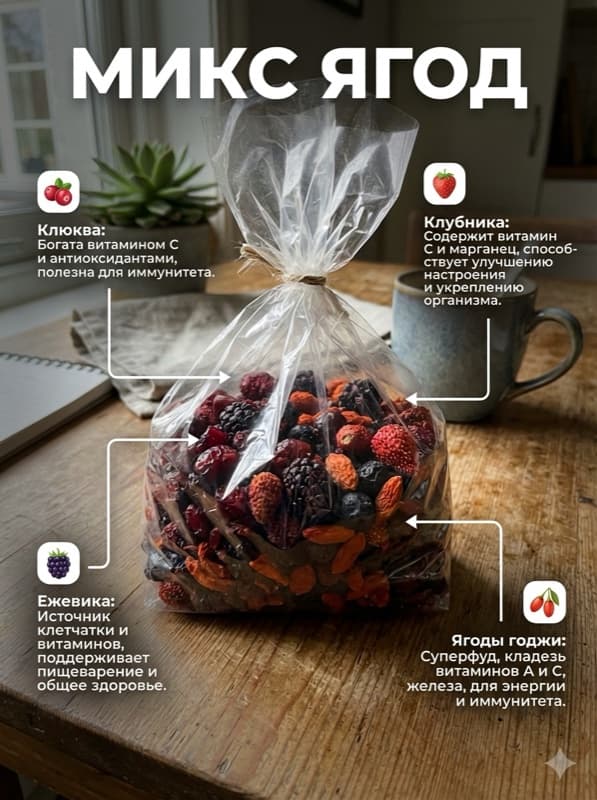
The food category has its own logic. The buyer looks for composition, expiration, certificates. "No sugar", "GOST such-and-such", "12-month shelf life" — all of this should be on the slides, not in the description. That said, an appetising presentation isn't off the table — warm tones and contrast are still in.
Kids' products

In the children's segment the parent cares about two things: is it safe and is it age-appropriate. "3–7 years", "BPA-free", "develops fine motor skills" — four to five short claims, each with an icon. Colours can be bright, but the background is better kept calm, otherwise the slides turn into a circus poster.
How to make a slide like this
The basic Sozdai flow takes a minute or two per slide. Upload one product photo, the neural net cuts it from the background and proposes what to write. You can edit the texts and pick a style, or accept it as-is and download the PNG. For a full card of 5–6 slides do several passes, shifting the focus each time: specs, material, use case. The first slide is free, no registration, so you can just try it on your own product.
If you want to dig deeper — compare Photoshop, Canva, and an AI generator, sort out photo requirements for WB and Ozon — see how to make a marketplace infographic.
FAQ
What's the slide size for Wildberries and Ozon?
Both marketplaces accept 3:4 aspect ratio. It's practically safe to use 1200×1600 — it works there, on Ozon, and on Yandex Market. JPG or PNG formats, up to 10 MB per file.
How many slides per card?
Usually four to six. Main photo, two to three slides with benefits and specs, a slide with composition or dimensions, optionally a use-case slide. More than six or seven rarely gets watched all the way through, statistics confirm. WB fits up to ten media in the carousel, Ozon up to fifteen.
Will a regular photo do, or do I need a studio?
For the main photo a studio is better — light and background decide a lot there. For infographic slides the neural net pulls the product out of practically any decent shot, the main thing is the product is in focus and not in deep shadow. A smartphone's front camera in daylight by a window usually handles it.
Is it really doable without a designer?
Yes, if you have up to fifty products per month. At that volume an AI generator covers almost everything; only the details get fine-tuned by hand. A designer pays off when SKUs run into the dozens and you need a unified brand style so all cards are recognisable in the category.
Try Sozdai for free
First infographic is free, with a watermark. No sign-up, no card required.
Create an infographic