 Sozdai
Avito profile banner
What it is
The profile banner is the image at the top of your shop page on Avito. The marketplace shows it in two sizes: 1202 × 436 pixels on desktop and 1242 × 936 on a phone. Sozdai makes both images in one click, as one scene in one style — the files arrive at the exact size, no cropping needed. The brief says so at the top: “Avito profile banner” and one line explaining that it is the picture at the top of your profile, made in both sizes — for the website and for the app.
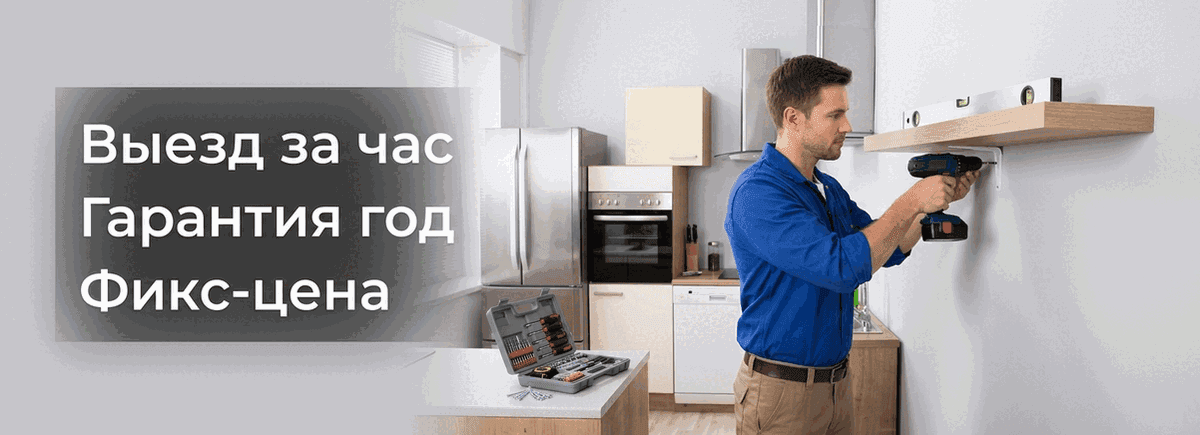
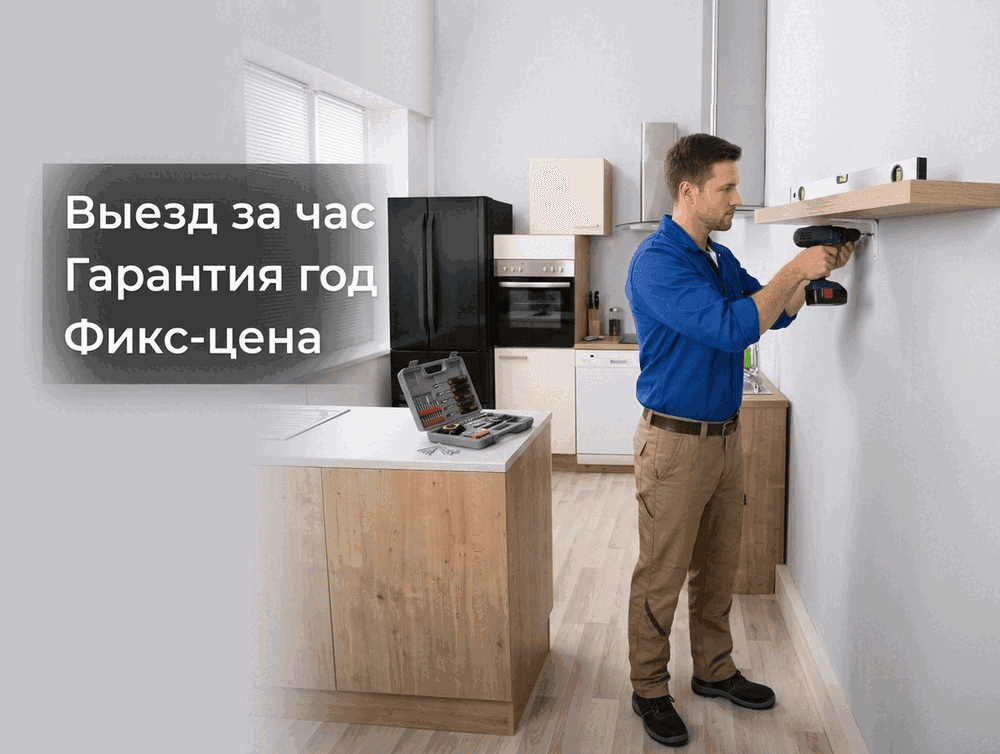
How to create one
The “Avito profile banner” item in the “Create” section of the sidebar (on a phone — the “+” button at the bottom, then “What do you want to create?”) — the add window opens right away — or “Projects” → “Create” → “Avito profile banner”. There is no marketplace to pick: the banner exists only on Avito. Next comes the name (or the line of work) and, optionally, photos of your work, the object or the specialist — the form shows how many you can attach.
In the project list such an object carries a “Brand · Avito” badge and shows up under the “Avito” filter.
The brief
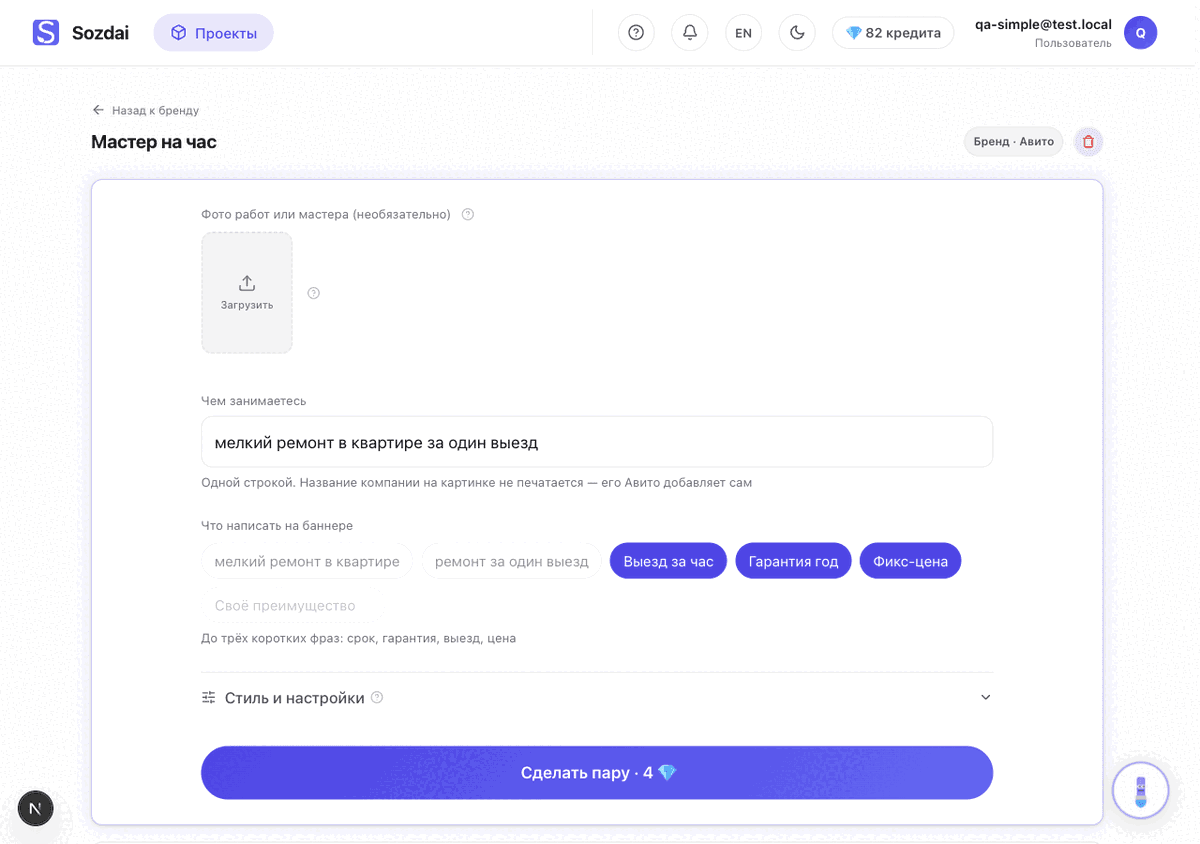
The screenshots predate the button renaming (2026-09-14): they still show “Make the pair” and “Download the pair (ZIP)” — in the app these are “Make the banner” and “Download both (ZIP)”.
- “What you do” — one line the AI builds the scene from. For example: “small flat repairs in a single call-out”.
- “What to write on the banner” — a few short phrases as chips: turnaround, warranty, call-out, price. The form shows the cap: it is small because Avito does not recommend more, and at 1202 pixels the phrases stop being readable. Once the cap is reached, the remaining chips and the “Your own benefit” field switch off. At least one phrase is required: it is the only text printed on the banner, and without it the “Make the banner” button stays disabled — the hint under it says so: “Add at least one line — it is the text on the banner”.
- Photos are optional. Without a photo the scene is built from the description; with a photo the frame shows your real object or specialist. Attach several and each of them appears on the banner, recognisable, in one shared composition. The counter in the form shows how many photos the banner takes.
- “Style and settings” — quality, style and free-form wishes. Format and marketplace are not asked here: for a banner they are fixed by Avito's own rules.
There is a single button — “Make the banner”, with the hint “Two files in exact sizes: for the Avito website and app. One price” under it. Both files are one banner and one price: 2 💎 on fast quality, 4 💎 on Pro — the same as a single ordinary image. While it is being drawn the screen says “Drawing the banner” and that it usually takes 40–90 seconds: the website version first, then the app version in the same scene.
The banner is assembled as a designed piece. An AI art director sets the style, the palette, the typography and the background to match your line of work: repair — reliability and tidiness, a lawyer or an accountant — calm competence, rentals — readiness and scale. The direction is decided once for both sizes, so the desktop and phone images come out in the same style. When photos of the work are attached, the AI designer first looks at them and writes the whole task for the artist: your object or specialist stays recognisable, while the scene around them is built for the banner's idea rather than copying the snapshot. Plates and graphics are part of the design, not a violation; the composition still follows Avito's rules. The features sit as one block in the middle band of the banner, and the designer picks the typefaces, hierarchy and accents inside that block for your business. The only text on the banner is the headline and the features from the brief. If there are no photos of your work, the scene is invented from the business description.
How far the designer may depart from the attached photos is set by the «How much to change the photo» row first in «Style and settings» — it appears once at least one photo is selected (a photo uploaded right in the brief is selected straight away). «Keep as is» — the photo is the banner, only the text is added and the light is fixed; «Tidy up» (default) — same scene and frame, a light touch-up of the photo, while the lettering and graphics get a designer's full care; «Redesign the scene» — the object and the specialist stay recognisable while the setting is built for the idea; «Reimagine from the photo» — the photo gives the idea, the object and the colours, and the scene is drawn anew. The level is chosen once for both sizes: “Finish the phone version” takes it from the finished website version.
What will not be on the banner
- The company name and the logo. Avito prints them over the banner itself; drawn inside the image they get duplicated, and the listing may be rejected. The object's name in Sozdai is for you only — it never reaches the picture.
- Phone numbers, links, addresses, QR codes. These are outright forbidden by the marketplace.
- Text right at the edges. Part of the banner is covered by Avito's own interface, and the desktop image is trimmed at the top and the bottom, so the wording stays in the middle of the frame with a margin on every side.
The result
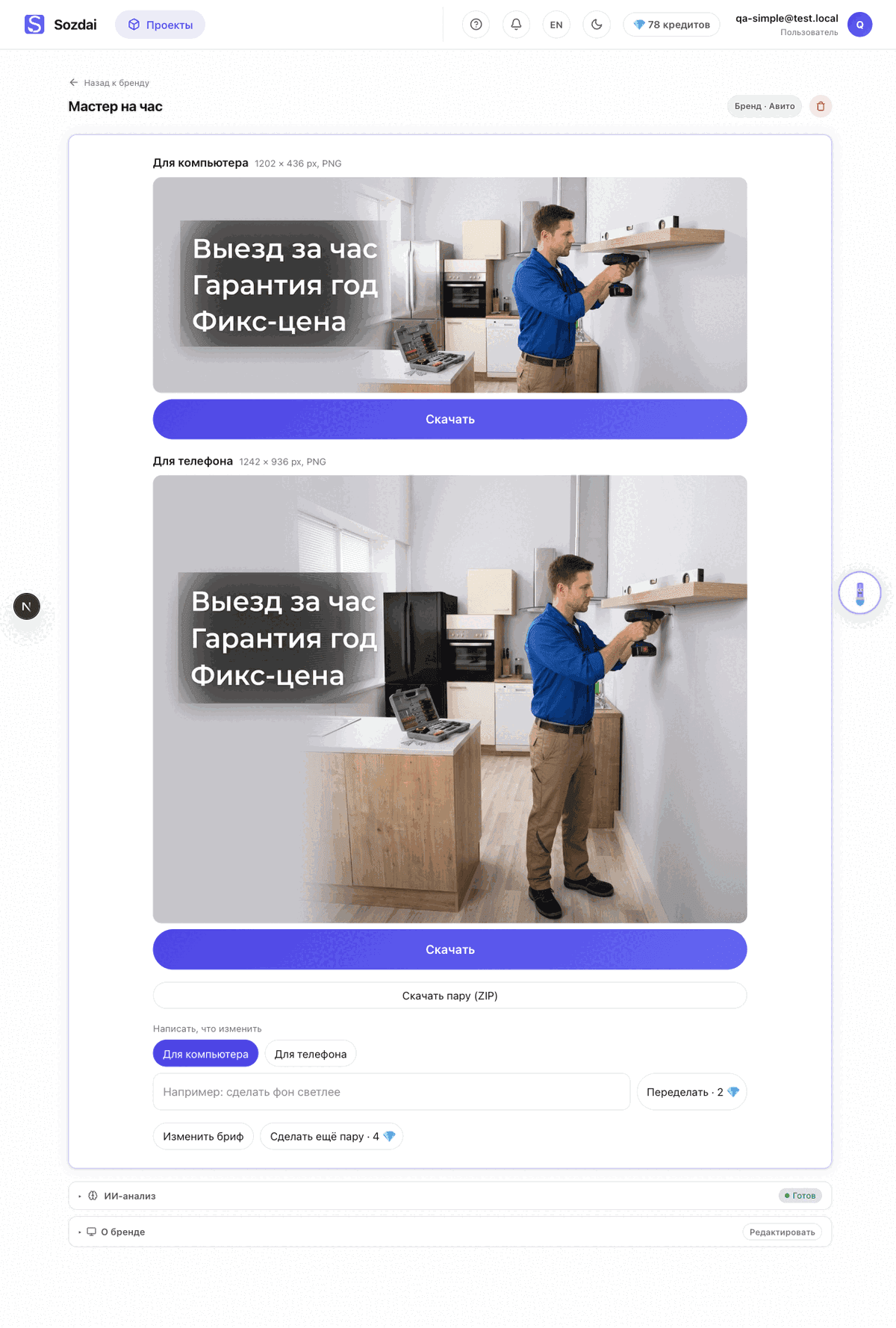
Above the images there is a hint on where they go: “Upload both files in your Avito profile design settings: the website uses the wide one, the app the tall one”. Then two images stacked: “Website — desktop” on top, “App — phone” below. Under each one there is “Download” (the file is already at the exact size, PNG), and under both — “Download both (ZIP)”.
- “Say what to change” — a regular refine of the selected image (2 💎). The toggle above picks which of the two is being edited.
- “Make another version” — a new banner (both sizes) from the same brief, at the same price.
- “Finish the phone version” appears if the second image did not come out: the banner charge is refunded in full (the website version stays for free), the screen says “The phone version didn’t come out — credits refunded. The website version stays; you can finish the phone one”, and the button repeats only the phone image using the finished website version — at the regular banner price.
A brand page opens the same way a product or service page does: photos of your work or team on top, the “Generated banners” gallery with every finished banner in both sizes below, and the “Make the banner” button opens the brief — already filled in with what you typed last time. “Edit the brief” takes you back to the brief from the result screen.
If you closed the page or lost the connection while the banner was being drawn, nothing is lost: the images are already saved and sit in the gallery, and within half an hour the same tab reopens the result screen by itself.
Pro mode and the step-by-step wizard do not open for a brand: the banner has a single surface and one simple wizard. Templates are not offered for brands either.
What next
How the other Avito object types work (product and service) and how listing photos are made are explained in “Avito listing mode”.